
Game Servers
Run a Minecraft server on Debian 13 with PaperMC (systemd, hardened, backups)
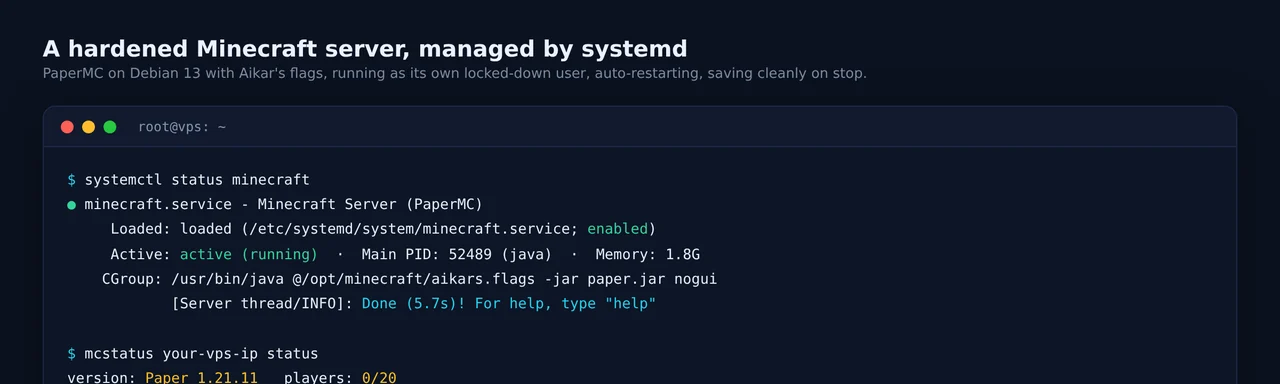
A Minecraft server is easy to start and easy to start badly: run the jar in a screen session, forget it, and lose the world to a hard reboot or an out-of-memory kill. This guide does it properly on a Debian 13 VPS: PaperMC for performance, Aikar’s flags for smooth garbage collection, a hardened systemd service that restarts on failure and saves the world when it stops, a firewall, and automatic backups. About twenty minutes, and it stays up.
What you need
- A Debian 13 VPS with root or sudo. 2 GB RAM minimum, more if you expect a crowd.
- A port you can open (TCP
25565by default). - The Minecraft Java client to connect and test.
Step 1: Install Java
Match Java to your Minecraft version. Minecraft 1.21 needs Java 21; the newest 26.x releases need Java 25. This guide uses 1.21 on Java 21:
apt update
apt install -y openjdk-21-jre-headless
java -version
Step 2: Create a dedicated user and get PaperMC
Never run a game server as root. Give it its own locked-down account with no login shell:
useradd -r -m -d /opt/minecraft -s /usr/sbin/nologin minecraft
cd /opt/minecraft
Now grab the latest Paper build. The easiest way is to copy the direct download link from papermc.io/downloads/paper. To script it against Paper’s API (install jq first with apt install -y jq):
VER=1.21.11
BUILD=$(curl -s "https://fill.papermc.io/v3/projects/paper/versions/$VER/builds" \
  | jq -r '.[0].build')
URL=$(curl -s "https://fill.papermc.io/v3/projects/paper/versions/$VER/builds/$BUILD" \
  | jq -r '.downloads."server:default".url')
curl -o paper.jar "$URL"
Step 3: Accept the EULA and set the basics
Minecraft will not start until you accept the EULA. Then drop in a minimal server.properties:
echo "eula=true" > eula.txt
cat > server.properties <<'PROPS'
motd=§b1337 Hosting §7» §fPaper server on a VPS
server-port=25565
server-ip=0.0.0.0
max-players=20
view-distance=8
simulation-distance=6
online-mode=true
spawn-protection=0
PROPS
Keep online-mode=true unless you have a specific reason not to. It verifies players against Mojang and keeps cracked clients and impostors out. Then hand ownership of everything to the minecraft user:
chown -R minecraft:minecraft /opt/minecraftStep 4: Add Aikar’s flags
The JVM’s default garbage collection causes lag spikes on a busy server. Aikar’s flags tune G1GC for Minecraft’s allocation pattern and are the community standard. Put them in a file, and set both memory values to the same number, your box’s RAM minus about 1 GB:
cat > /opt/minecraft/aikars.flags <<'FLAGS'
-Xms3G -Xmx3G -XX:+UseG1GC -XX:+ParallelRefProcEnabled -XX:MaxGCPauseMillis=200
-XX:+UnlockExperimentalVMOptions -XX:+DisableExplicitGC -XX:+AlwaysPreTouch
-XX:G1NewSizePercent=30 -XX:G1MaxNewSizePercent=40 -XX:G1HeapRegionSize=8M
-XX:G1ReservePercent=20 -XX:G1HeapWastePercent=5 -XX:G1MixedGCCountTarget=4
-XX:InitiatingHeapOccupancyPercent=15 -XX:G1MixedGCLiveThresholdPercent=90
-XX:G1RSetUpdatingPauseTimePercent=5 -XX:SurvivorRatio=32
-XX:+PerfDisableSharedMem -XX:MaxTenuringThreshold=1
FLAGS
chown minecraft:minecraft /opt/minecraft/aikars.flags
Change -Xms3G -Xmx3G to fit your server. On a 4 GB box, 3G is a good value.
Step 5: The systemd service
This is the part most guides get wrong. A proper unit runs as the minecraft user, restarts on failure, waits long enough for a clean shutdown, and locks the process out of the rest of the system. Create /etc/systemd/system/minecraft.service:
[Unit]
Description=Minecraft Server (PaperMC)
After=network-online.target
Wants=network-online.target

[Service]
User=minecraft
Group=minecraft
WorkingDirectory=/opt/minecraft
ExecStart=/usr/bin/java @/opt/minecraft/aikars.flags -jar paper.jar nogui
Restart=on-failure
RestartSec=10
SuccessExitStatus=0 143
TimeoutStopSec=90
# hardening
NoNewPrivileges=true
ProtectSystem=strict
ReadWritePaths=/opt/minecraft
ProtectHome=true
PrivateTmp=true
ProtectKernelTunables=true
ProtectControlGroups=true
RestrictSUIDSGID=true
Two lines matter for data safety. SuccessExitStatus=0 143 tells systemd that exit code 143 (killed by SIGTERM) is a normal stop, not a crash. TimeoutStopSec=90 gives Paper time to save large worlds before systemd gives up. When you run systemctl stop minecraft, Paper catches the signal and saves:
[Server thread/INFO]: ThreadedAnvilChunkStorage: All dimensions are savedEnable and start it:
systemctl daemon-reload
systemctl enable --now minecraft
systemctl status minecraft
Step 6: Open the firewall
Java edition uses TCP 25565. Debian 13 ships without an active firewall, but if you run ufw:
ufw allow 25565/tcpIf your provider has an edge firewall, allow it there too. On our VPS plans nothing blocks it by default. (Bedrock clients would need UDP 19132 and a Bedrock or Geyser server instead.)
Test from outside your own network by adding your VPS IP as a server in the Minecraft client. It shows online with your MOTD, or check it from the command line with a tool like mcstatus:
$ mcstatus your-vps-ip status
version: Paper 1.21.11
players: 0/20
Step 7: Automatic backups
A live server is one bad plugin or one /fill away from a ruined world. Add a backup script and a nightly timer. Save /usr/local/sbin/mc-backup.sh:
#!/usr/bin/env bash
set -euo pipefail
SRV=/opt/minecraft
DEST=$SRV/backups
KEEP=7                       # keep the last 7 backups
ts=$(date +%Y-%m-%d_%H%M%S)
tar -czf "$DEST/world-$ts.tar.gz" -C "$SRV" world world_nether world_the_end
ls -1t "$DEST"/world-*.tar.gz | tail -n +$((KEEP+1)) | xargs -r rm -f
echo "backup: $DEST/world-$ts.tar.gz"
Create the folder and make it runnable:
install -d -o minecraft -g minecraft /opt/minecraft/backups
chmod +x /usr/local/sbin/mc-backup.sh
Then a systemd timer to run it every night at 04:00:
cat > /etc/systemd/system/mc-backup.service <<'UNIT'
[Unit]
Description=Minecraft world backup
[Service]
Type=oneshot
User=minecraft
ExecStart=/usr/local/sbin/mc-backup.sh
UNIT

cat > /etc/systemd/system/mc-backup.timer <<'UNIT'
[Unit]
Description=Nightly Minecraft backup
[Timer]
OnCalendar=*-*-* 04:00:00
Persistent=true
[Install]
WantedBy=timers.target
UNIT

systemctl daemon-reload
systemctl enable --now mc-backup.timer
For a perfectly consistent snapshot on a busy server, run save-off and save-all in the console before the tar and save-on after. For a small friends server, Paper’s own autosave plus this nightly tar is plenty. Copy the backups off the box periodically too, a server backup on the same server is only half a backup.
The short version
apt install -y openjdk-21-jre-headless jq
useradd -r -m -d /opt/minecraft -s /usr/sbin/nologin minecraft
cd /opt/minecraft
# download the latest Paper build (see Step 2), then:
echo "eula=true" > eula.txt
# write server.properties + aikars.flags, then:
chown -R minecraft:minecraft /opt/minecraft
# drop in /etc/systemd/system/minecraft.service, then:
systemctl enable --now minecraft
ufw allow 25565/tcp
Minecraft leans hard on single-thread CPU and fast disk, so a modern high-clock core and NVMe matter more than a big core count. Our Ryzen 9 NVMe VPS nodes in the Frankfurt metro fit that exactly and deploy in under a minute, with a dedicated IPv4 so friends connect straight to your IP. If a big group ever tries to knock it offline, that is what our Minecraft DDoS protection is for, and the Shield line it runs on.
Frequently asked questions
Why PaperMC instead of the vanilla server?
Paper is a drop-in replacement for the vanilla server that is much faster, fixes a long list of exploits, and supports plugins. For the same hardware it holds more players at a better tick rate. Your worlds and configs are compatible.
How much RAM does a Minecraft server need?
For a few friends, 2 to 4 GB is comfortable. Give the JVM heap the box's RAM minus about 1 GB for the operating system, and set the minimum and maximum heap to the same value (Aikar's recommendation) so the JVM does not fight itself resizing.
Which Java version do I need?
Match Java to the Minecraft version. Minecraft 1.21 runs on Java 21, which is what this guide uses. The newest Minecraft releases (26.x) require Java 25. Running too old a Java is the most common reason a server refuses to start.
Does stopping the service corrupt the world?
No. Paper saves the world on SIGTERM, which is exactly what systemctl stop sends. The service log shows all dimensions saved before it exits. The nightly backup timer in this guide is your second safety net.
Java edition or Bedrock?
This guide is Java edition, which uses TCP 25565. Bedrock (phones, consoles, Windows 10/11) uses UDP 19132 and a different server. You can bridge the two with a plugin like Geyser, but that is a separate topic.