
Game Servers
Set up a TeamSpeak server on Debian 13 (systemd, firewall, hardening)
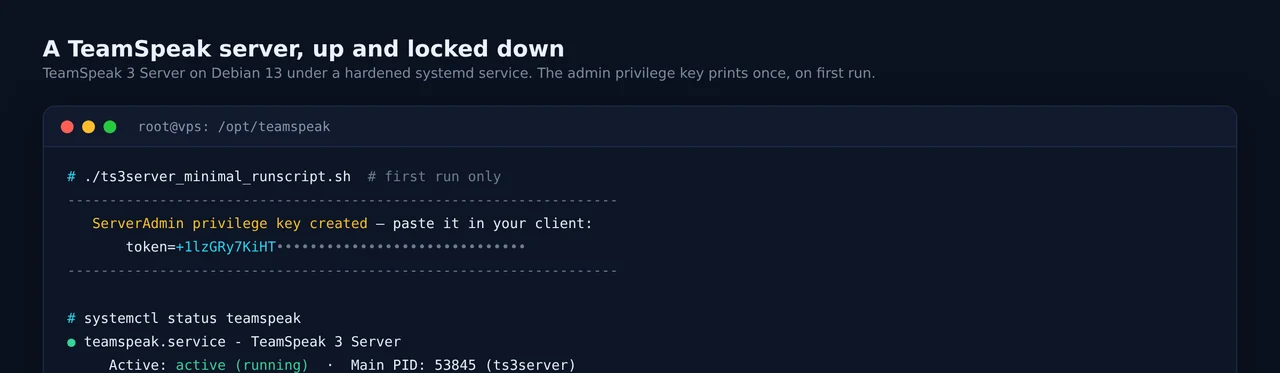
TeamSpeak is still the go-to for low-latency, self-hosted voice: no accounts, no per-seat billing, your own server your rules. This guide sets up TeamSpeak 3 Server 3.13.7 on a Debian 13 VPS the right way, a dedicated user, a systemd service, the correct firewall, and a ServerQuery that is not hanging open to the internet. About fifteen minutes.
Modern TeamSpeak 5 and 6 clients connect to a TS3 server without issue, so this is still the right server to run in 2026. (The standalone TeamSpeak 6 server is beta with a rolling 32-slot license, keep it for testing.)
What you need
- A Debian 13 VPS with root. TeamSpeak is very light; the smallest plan is fine.
- The ability to open UDP 9987.
- The TeamSpeak client to connect and claim admin.
Step 1: Create a user and download the server
Run it as its own unprivileged account, never root. The server only needs bzip2 to unpack:
apt update && apt install -y bzip2 wget
useradd --system --create-home --home-dir /opt/teamspeak --shell /usr/sbin/nologin teamspeak
cd /opt/teamspeak
sudo -u teamspeak wget -O ts3.tar.bz2 \
  https://files.teamspeak-services.com/releases/server/3.13.7/teamspeak3-server_linux_amd64-3.13.7.tar.bz2
sudo -u teamspeak tar -xjf ts3.tar.bz2 --strip-components=1
sudo -u teamspeak rm ts3.tar.bz2
Step 2: Accept the licence and grab the admin token
TeamSpeak will not start until you accept its licence. Create the flag file it looks for:
sudo -u teamspeak touch /opt/teamspeak/.ts3server_license_acceptedNow run the server once in the foreground so the first-run credentials print. They appear only when the database is created, so capture them:
cd /opt/teamspeak
sudo -u teamspeak sh -c 'TS3SERVER_LICENSE=accept ./ts3server_minimal_runscript.sh \
  serveradmin_password=YOUR_STRONG_PASSWORD'
In the output, save these two lines:
      ServerAdmin privilege key created, please use it to gain
      serveradmin rights for your virtualserver.
       token=+1lzGRy7KiHT..............................
The token= is your ServerAdmin privilege key: connect with the TeamSpeak client, then Permissions > Use Privilege Key, paste it, and you become the server admin. The serveradmin account is for ServerQuery (remote administration). Once you have copied both, press Ctrl-C to stop this foreground run and hand it to systemd.
Step 3: The systemd service
Create /etc/systemd/system/teamspeak.service:
[Unit]
Description=TeamSpeak 3 Server
After=network.target

[Service]
Type=forking
User=teamspeak
Group=teamspeak
WorkingDirectory=/opt/teamspeak
Environment="TS3SERVER_LICENSE=accept"
ExecStart=/opt/teamspeak/ts3server_startscript.sh start
ExecStop=/opt/teamspeak/ts3server_startscript.sh stop
PIDFile=/opt/teamspeak/ts3server.pid
Restart=on-failure
RestartSec=5
# hardening
NoNewPrivileges=true
ProtectSystem=strict
ReadWritePaths=/opt/teamspeak
ProtectHome=true
PrivateTmp=true
Enable and start it:
systemctl daemon-reload
systemctl enable --now teamspeak
systemctl status teamspeak
You should see active (running) and, with ss -lnup | grep 9987, the voice port listening.
Step 4: Firewall, and keep ServerQuery private
TeamSpeak’s ports and how to treat each one:
UDP 9987carries voice. It is the only port players need, so open it.TCP 30033is file transfer for avatars, icons and the file browser. Open it if you use them.TCP 10011is ServerQuery, in cleartext. Do not expose it. It is the most-attacked TeamSpeak surface.
Debian 13 ships without an active firewall. With ufw:
ufw allow 9987/udp
ufw allow 30033/tcp
# note: NOT 10011
Then bind ServerQuery to localhost so it never touches the public interface even if the firewall lapses. Generate a config template and edit it:
sudo -u teamspeak ./ts3server createinifile=1In the generated ts3server.ini, set:
query_ip=127.0.0.1,::1
query_ssh_ip=127.0.0.1
and point the service at it by adding inifile=ts3server.ini to the ExecStart line. To administer ServerQuery remotely, SSH-tunnel to it instead of opening the port:
ssh -L 10011:127.0.0.1:10011 you@your-vpsStep 5: A couple of things that bite people
- The bundled licence has a date. The default licence in 3.13.7 runs until July 2027. When it lapses (or if you exceed 32 slots), the server refuses to start until you drop a valid
licensekey.datin the directory. Put a reminder in your calendar. - Back up
ts3server.sqlitedbfor the whole server state, thefiles/directory for uploaded icons and avatars, andts3server.ini. That is everything. - Debian 13 has IPv6 on by default. If your clients are on IPv6 and voice fails, set
voice_ip=0.0.0.0,::and open UDP 9987 on the v6 side too. - ServerQuery temp-bans failed logins by default. Keep it on localhost and this whole class of attack disappears.
The short version
apt install -y bzip2 wget
useradd --system --create-home --home-dir /opt/teamspeak --shell /usr/sbin/nologin teamspeak
cd /opt/teamspeak
sudo -u teamspeak wget -O ts3.tar.bz2 https://files.teamspeak-services.com/releases/server/3.13.7/teamspeak3-server_linux_amd64-3.13.7.tar.bz2
sudo -u teamspeak tar -xjf ts3.tar.bz2 --strip-components=1
sudo -u teamspeak touch .ts3server_license_accepted
# run once to capture token=... then Ctrl-C, drop in the systemd unit, then:
systemctl enable --now teamspeak
ufw allow 9987/udp && ufw allow 30033/tcp
Voice servers live and die on latency and uptime, not raw power. Our low-latency NVMe VPS nodes in the Frankfurt metro keep the ping down for European users, and TeamSpeak is one of the profiles our Shield DDoS protection tunes for, so a booter aimed at your voice server does not end your game night.
Frequently asked questions
TeamSpeak 3 or the new TeamSpeak 6 server?
For anything you actually want people on, run TeamSpeak 3 Server 3.13.7. It is the stable, licensable release, and modern TeamSpeak 5 and 6 clients connect to it fine. The TeamSpeak 6 server is still beta with a rolling 32-slot beta license and no migration path, so keep it to lab use for now.
Do I need a license?
No, not for a normal server. One virtual server with up to 32 slots is free for non-commercial use. Above 32 slots, more than one virtual server, or any commercial use, you need a license: the free Non-Profit License raises the limits for eligible groups, and there is a paid tier for commercial hosts.
I lost the admin token. What now?
The ServerAdmin privilege key and the ServerQuery password only print when the database is first created. If you lost the token, generate a new one over ServerQuery with the tokenadd command, or reset the query password by starting the server once with serveradmin_password=NEWPASS.
Which ports do I open?
UDP 9987 for voice is the only one players need. Open TCP 30033 too if you want file transfer, avatars and icons. Keep ServerQuery (TCP 10011) bound to localhost and never expose it to the internet, it is the most abused TeamSpeak surface.
Related guides
Game Servers
Run a Minecraft server on Debian 13 with PaperMC (systemd, hardened, backups)
Intermediate · 20 min
VPN
Set up a WireGuard VPN on Debian 13 with a web UI (wg-easy)
Beginner · 10 min
Networking
Port forwarding behind CGNAT (Starlink, 4G, 5G) with WireGuard and a VPS
Intermediate · 20 min