
Self-Hosting
Build a private seedbox on Debian 13: qBittorrent, Sonarr, Radarr, behind a VPN kill-switch
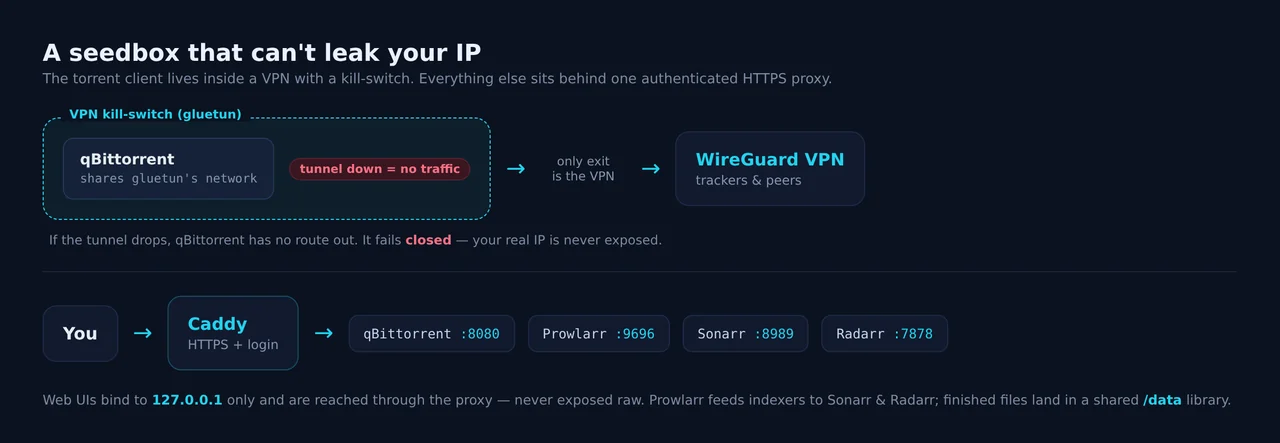
A seedbox automates the boring parts of self-hosting media: it finds releases, downloads them, and files them away, all without your home connection or your real IP ever touching a tracker. This guide builds one on a Debian 13 VPS. The centrepiece is safety: qBittorrent runs sealed inside a VPN with a kill-switch, so if the tunnel ever drops, downloads stop instead of leaking. Around it, Prowlarr, Sonarr and Radarr handle indexers and automation, all reached through one authenticated HTTPS proxy.
This is the most involved guide in the series, budget about thirty minutes. It assumes you are comfortable on the command line and have read the Debian VPS basics.
What you need
- A Debian 13 VPS with root. 2 GB RAM and a decent disk (torrents eat space).
- A VPN provider that gives you a WireGuard config, ideally with port forwarding for seeding.
- Docker installed (
curl -fsSL https://get.docker.com | sh).
Step 1: A shared media user and one data tree
Every piece of the stack runs as one unprivileged media user and shares a single /data tree, so hardlinks and atomic moves work and nothing runs as root:
adduser --system --group --home /var/lib/media --shell /usr/sbin/nologin media
mkdir -p /data/torrents /data/media
chown -R media:media /data
id media    # note the uid and gid, you will need them below
Step 2: qBittorrent inside a VPN kill-switch
This is the important part. Instead of running qBittorrent directly, run it inside a gluetun container and share gluetun’s network. gluetun brings up your VPN with a default-drop firewall: the only way out is the tunnel, and if the tunnel drops the client is boxed in. Create /opt/seedbox/docker-compose.yml:
services:
  gluetun:
    image: qmcgaw/gluetun:latest
    container_name: gluetun
    cap_add: [NET_ADMIN]
    devices: [/dev/net/tun:/dev/net/tun]
    environment:
      - VPN_SERVICE_PROVIDER=custom       # or protonvpn / mullvad / airvpn
      - VPN_TYPE=wireguard
      - WIREGUARD_PRIVATE_KEY=${WG_PRIVATE_KEY}
      - WIREGUARD_ADDRESSES=10.2.0.2/32
      - WIREGUARD_PUBLIC_KEY=${WG_PEER_PUBKEY}
      - WIREGUARD_ENDPOINT_IP=${WG_ENDPOINT_IP}
      - WIREGUARD_ENDPOINT_PORT=51820
      # only your management IP may reach the WebUI, everything else is dropped
      - FIREWALL_OUTBOUND_SUBNETS=127.0.0.1/32
    ports:
      - "127.0.0.1:8080:8080"             # qBittorrent WebUI, published on gluetun
    restart: unless-stopped

  qbittorrent:
    image: lscr.io/linuxserver/qbittorrent:latest
    container_name: qbittorrent
    network_mode: "service:gluetun"       # <-- shares gluetun's network, no ports here
    environment:
      - PUID=998                           # your media uid
      - PGID=998                           # your media gid
      - WEBUI_PORT=8080
    volumes:
      - /var/lib/media/qbt:/config
      - /data:/data
    depends_on: [gluetun]
    restart: unless-stopped
Put your VPN provider’s WireGuard values in /opt/seedbox/.env (WG_PRIVATE_KEY=..., etc.), then start it:
cd /opt/seedbox
docker compose up -d
The line that does the magic is network_mode: "service:gluetun". qBittorrent has no network of its own; it lives inside gluetun’s namespace, so its only route to the internet is the VPN. Publish the WebUI port on the gluetun service, never on qbittorrent.
qBittorrent 5.x no longer ships a default password. Grab the one-time password from the log and log in at http://127.0.0.1:8080:
docker logs qbittorrent | grep -i "temporary password"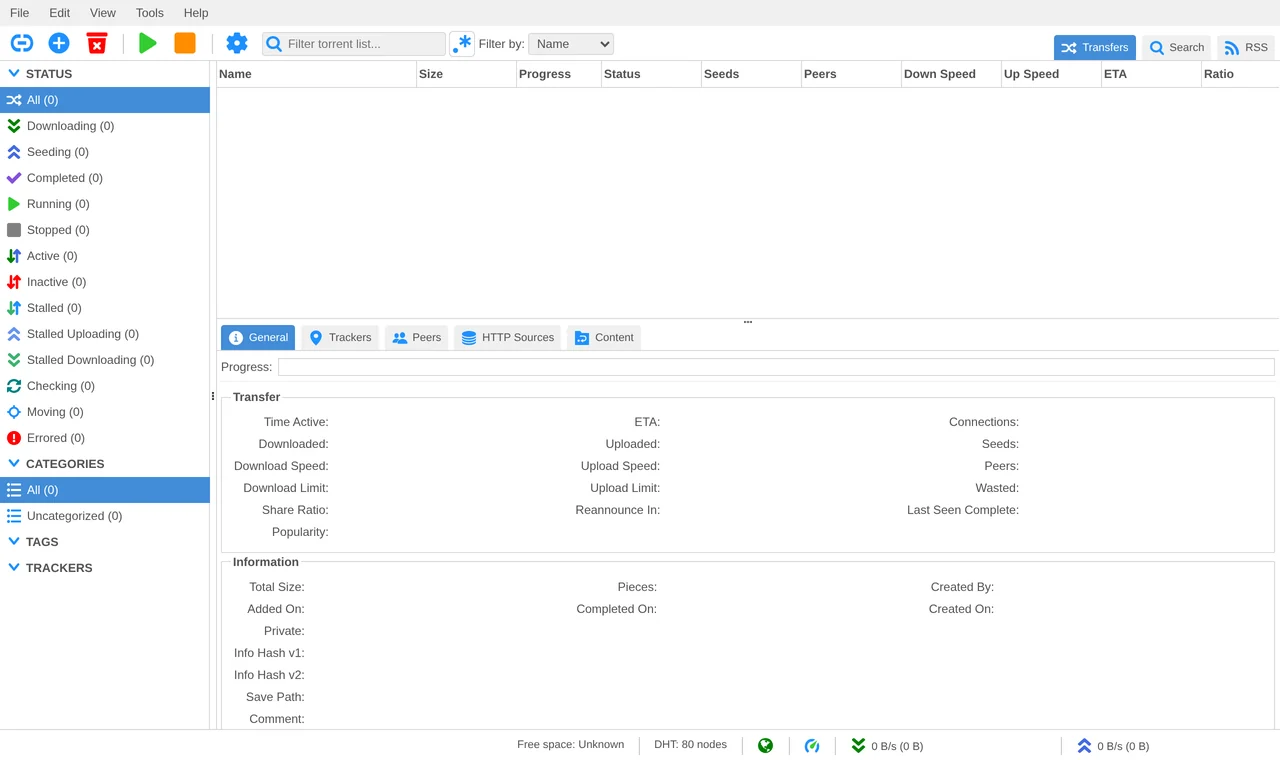
In Tools > Options > Web UI, set a real password. Then prove the kill-switch works before you download anything:
# both should print the VPN's IP, and it must NOT be your VPS IP
docker exec gluetun     wget -qO- https://ipinfo.io/ip
docker exec qbittorrent wget -qO- https://ipinfo.io/ip
# now drop the tunnel: the client must lose all connectivity
docker stop gluetun
docker exec qbittorrent wget -qO- https://ipinfo.io/ip   # must hang/fail, NOT return an IP
docker start gluetun
If that last command hangs instead of printing an address, your seedbox is fail-closed. That is the whole point.
Step 3: Prowlarr, Sonarr and Radarr
These run natively as the media user. The fastest route is the community servarr install script, run once per app (it writes the systemd unit and lets you pick the media user):
curl -o /tmp/servarr.sh https://raw.githubusercontent.com/Servarr/Wiki/master/servarr/servarr-install-script.sh
bash /tmp/servarr.sh    # choose prowlarr, then run again for sonarr, radarr
They come up on their default ports: Prowlarr 9696, Sonarr 8989, Radarr 7878. On first load, each one now forces you to set an authentication method, this is a recent, welcome default:
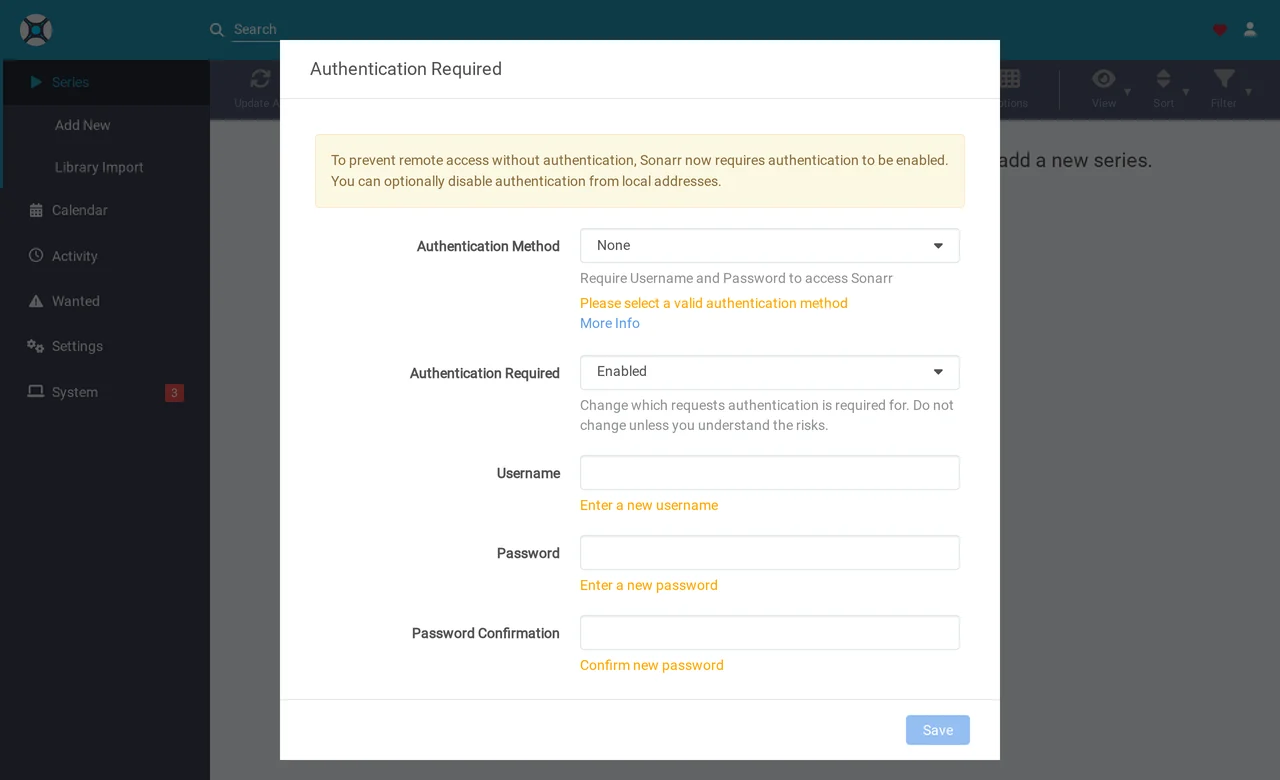
Set a username and password, then wire them together: in Prowlarr > Settings > Apps, add Sonarr and Radarr (with their API keys from each app’s Settings > General), and Prowlarr pushes your indexers to both. In Sonarr and Radarr, add qBittorrent as the download client (host 127.0.0.1, port 8080, your WebUI login). Point every app’s root folder at /data/media.
Step 4: One authenticated proxy in front
The web UIs are bound to localhost, so put a single reverse proxy in front to add HTTPS and a login. Caddy is the least fuss (apt install -y caddy), with automatic Let’s Encrypt certificates. A minimal /etc/caddy/Caddyfile:
seedbox.example.com {
    basic_auth {
        admin <hash from: caddy hash-password>
    }
    handle_path /qbt/*      { reverse_proxy 127.0.0.1:8080 }
    handle_path /prowlarr/* { reverse_proxy 127.0.0.1:9696 }
    handle_path /sonarr/*   { reverse_proxy 127.0.0.1:8989 }
    handle_path /radarr/*   { reverse_proxy 127.0.0.1:7878 }
}
Set each *arr app’s URL Base (Settings > General) to match its path (/sonarr, etc.). Now the only thing exposed to the internet is port 443 with a login, and everything behind it speaks plain HTTP on localhost.
Step 5: Lock the front door
Keep the host firewall tight. Only SSH and the proxy should be reachable:
apt install -y ufw
ufw default deny incoming
ufw default allow outgoing
ufw allow 22/tcp
ufw allow 80,443/tcp
ufw enable
A few things that bite people, worth knowing up front:
- Docker can punch through ufw. Publish container ports to
127.0.0.1:(as in the compose above), never0.0.0.0:, or the WebUI is world-reachable no matter what ufw says. - IPv6 is the classic torrent leak. gluetun blocks it by default; that is another reason to keep the client inside it.
- Bind qBittorrent’s listen interface to the tunnel in its advanced settings as a belt-and-braces second layer.
- Port forwarding matters for ratio. Behind NAT with no forwarded port you are download-only. If your provider supports it, gluetun can expose the forwarded port to feed into qBittorrent.
The short version
# shared user + data
adduser --system --group --home /var/lib/media --shell /usr/sbin/nologin media
mkdir -p /data/{torrents,media} && chown -R media:media /data

# qBittorrent sealed in gluetun (edit compose with your VPN's WireGuard keys)
cd /opt/seedbox && docker compose up -d
docker logs qbittorrent | grep -i "temporary password"

# arr stack (run once per app)
bash <(curl -s https://raw.githubusercontent.com/Servarr/Wiki/master/servarr/servarr-install-script.sh)

# verify the kill-switch fails closed
docker stop gluetun && docker exec qbittorrent wget -qO- https://ipinfo.io/ip   # must fail
docker start gluetun
A seedbox wants steady bandwidth and room to grow, not a huge core count. Our NVMe VPS nodes in the Frankfurt metro give you fast disk, generous transfer, and a stable IP to run this on, and if you ever get attention you would rather not, the DDoS protection is already in front of it.
Frequently asked questions
Do I really need the VPN kill-switch?
If you torrent, yes. Without a kill-switch, the moment your VPN reconnects or drops, qBittorrent keeps talking to trackers and peers over your real IP. The gluetun setup here makes the VPN the client's only possible route, so a dropped tunnel means no traffic at all, not a leak.
Why run qBittorrent in Docker but the *arr apps natively?
Only the torrent client needs to be sealed inside the VPN. Prowlarr, Sonarr and Radarr just talk to indexers and the client's API, and you do not want them behind the VPN (it slows metadata lookups and complicates routing). Keeping them native and the client containerised is the clean split.
Which VPN providers work?
Any provider that gives you a WireGuard config works with gluetun. For seeding you want one that supports port forwarding (so peers can reach you), such as ProtonVPN, AirVPN or Mullvad. Feed the forwarded port into qBittorrent for healthy ratios.
Is it safe to expose the web UIs?
Never expose them raw. qBittorrent, Prowlarr, Sonarr and Radarr each listen on localhost only, and you reach them through a single reverse proxy that adds HTTPS and a login. The *arr apps now force you to set an authentication method on first run, which is a good default, but the proxy is still your main gate.
Related guides
VPN
Set up a WireGuard VPN on Debian 13 with a web UI (wg-easy)
Beginner · 10 min
Networking
Port forwarding behind CGNAT (Starlink, 4G, 5G) with WireGuard and a VPS
Intermediate · 20 min
Game Servers
Run a Minecraft server on Debian 13 with PaperMC (systemd, hardened, backups)
Intermediate · 20 min