Rust server DDoS protection

Rust attacks arrive on a schedule

The thing that makes Rust different is when the traffic shows up. Attacks land during raids and at peak population, because that is when a disconnect does the most damage to a server’s reputation. Somebody loses a raid, and the server goes down twenty minutes later.

That timing is the argument for always-on filtering, and it is worth being concrete about why. Reactive mitigation has to notice an attack before it can act. On our Standard VPS line that decision takes roughly five seconds. For a web server, five seconds of packet loss is a slow page load. For a Rust server mid-raid it is every connected player dropping at once, and there is nothing stopping the attacker from repeating it as soon as filtering stands down.

What Rust DDoS protection actually filters

Every packet aimed at our range crosses the scrubbing layer before it reaches a customer machine, and on Shield it does so continuously. For Rust the relevant filter validates the RakNet handshake: a connection that cannot complete one correctly is dropped at the edge, which is where bot joins and connection floods stop.

The filtering runs as an XDP program at our own edge in the Frankfurt metro. Dropping a packet there costs a roughly fixed amount of work no matter how large the attack gets, and it costs your server nothing, because the packet never arrives.

Rust Console is a separate profile, since it uses DTLS rather than plain RakNet. Your server browser listing is Steam query traffic and has its own profile again. All three ship on every Shield plan, and they are separate filters because they are separate protocols.
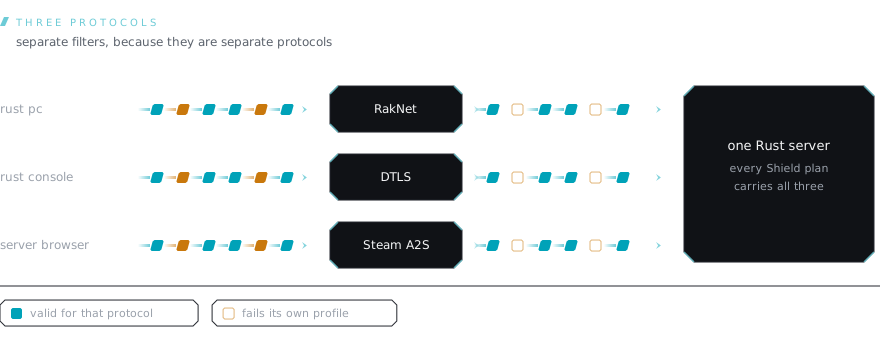
Three inbound lanes reach the same Rust server. The PC lane is validated by the RakNet profile, the console lane by the DTLS profile, and the server browser lane by the Steam A2S profile. Each lane's invalid traffic is dropped by its own filter, drawn as hollow outlines, because the three are separate protocols and need separate filters.

What it will not fix

A Rust server is heavy. Large maps, high population and a deep plugin stack all cost single-core performance, and entity counts late in a wipe cost more. None of that is a network problem, and no amount of filtering in front of the box changes it.

This matters commercially, so it is worth saying plainly rather than in a footnote: if your server stutters at 150 players on a month-old map, protection is not the product you need. Attack traffic and a saturated main thread feel identical from the client, and it is cheap to establish which one you have before spending anything.

Sizing it

Rust is the most demanding server we host, and the gap between it and the rest is not close. Facepunch asks for 12 GB of RAM before you have added a single plugin, which is more than four of our six Shield tiers have in total.

Two things push it past that number. Map size is one: memory scales with the world, and a 6k map costs noticeably more than the 3k default. Wipe age is the other, and it is the one people are caught by. Entity counts climb all month as bases go up, so the server that sat comfortably on wipe day is a different workload three weeks later. Size for week four, not for the first evening.

The rest is single-core speed. Rust’s tick runs on one thread, so clock rate decides your framerate under load and extra cores go to the plugins and the database beside it.

Sources

  • Facepunch's Rust wiki lists 12 GB free RAM and 15 GB free disk space for a dedicated server, noting a 6k map will use more. source checked 2026-08-08

shield plans

What Rust needs

Pricing in EUR · 20% Austrian VAT for AT consumers · Reverse charge for EU B2B

Facepunch documents 12 GB of free RAM and 15 GB of disk for a Rust server, and notes that a 6k map will use more. That is the highest published floor of any game we run, and it rules out the four cheapest Shield tiers outright.

Minimum

Shield XXL

€54,99 EUR / mo

The first tier that clears Facepunch's documented 12 GB, on a small map.

  • 6× vCPU · Ryzen 9 9950X
  • 16 GB DDR5 RAM
  • 150 GB NVMe SSD
  • Port 25 Gbps shared 35 TB fair use (outbound)
  • Advanced DDoS protection
  • 1× IPv4 address
  • IPv6 /64 included
Order now
Recommended

Shield Pro

€99,99 EUR / mo

A populated server on a large map, still healthy late in a wipe.

  • 8× vCPU · Ryzen 9 9950X
  • 32 GB DDR5 RAM
  • 200 GB NVMe SSD
  • Port 25 Gbps shared 75 TB fair use (outbound)
  • Advanced DDoS protection
  • 1× IPv4 address
  • IPv6 /64 included
Order now

Every tier carries the same always-on filtering and the same 25 Gbps uplink, so the choice above is about compute, not about protection.

Frequently asked questions

Why does always-on matter more on Rust than on a website?

Because of when attacks land. Rust attacks arrive during raids and at peak population, which is precisely when a disconnect costs the most. On our Standard line filtering is reactive and takes roughly five seconds to engage. Five seconds of packet loss mid-raid drops every player on the box, and the attacker only has to do it again. Shield has no window to sit through.

Does the profile cover Rust Console?

Yes, as a separate profile. The console edition uses DTLS rather than plain RakNet, so it gets its own filter, with a stricter variant available if sustained pressure gets through the standard one. Both ship on Shield.

Will it stop players being kicked by a server-browser attack?

Server browser traffic is Steam query, and reflection abuse aimed at it is handled by our Steam Query profile rather than the RakNet one. Both are included. They are separate filters because they are separate protocols, and an attack on your listing looks nothing like an attack on your game port.

Does the filtering interfere with Oxide, Carbon or a heavy plugin set?

No. Validation happens on the RakNet handshake at the edge, before anything your plugin stack would see, and it does not inspect or alter gameplay traffic afterwards. A plugin that stalls the server under load is an application problem and it will behave the same way with the filtering in front of it.

What about a wipe day, when a lot of players connect at once?

A wipe looks like a connection spike to any automated detection, and our terms are explicit that legitimate traffic with attack-like shape can be misclassified. In practice handshake validation handles a wipe well, because real clients complete the handshake and bots do not. If you are expecting an unusual surge, telling support in advance is worth doing.

Can you tell me whether I am being attacked or just overloaded?

Often, yes, and it is the first thing worth establishing. An attack shows up as traffic your server never asked for. Overload shows up as a server that is busy doing work it accepted. They feel identical to a player and they have opposite fixes, so buying protection for what turns out to be a single-threaded bottleneck helps nobody.

Keep reading